
Download Veho Muvi K-Series – Connect, Record, and Share Wirelessly
Overview
The Veho Muvi K-Series app is a dedicated mobile tool designed to enhance the functionality of the K-Series camcorder lineup, including the Muvi K2, K3, K4, and K5 models. It enables wireless connectivity between the camcorder and Android smartphones through a Wi-Fi network, allowing users to control recording, capture photos, and manage media remotely. The app is tailored for individuals who value convenience and flexibility in capturing video content, especially in scenarios where traditional camera handling is impractical—such as during sports, travel, or hands-free vlogging.
By providing a live feed preview on the smartphone screen, users can frame shots from unique angles or remote positions without physically touching the device. The app’s primary purpose is to streamline the video capture process and simplify media sharing, eliminating the need to manually transfer files after recording. While the developer did not provide additional background on Veho’s company structure or history, the app’s focus on seamless integration with the K-Series hardware suggests a targeted approach to improving user experience within a specific product ecosystem.
The app is available at no cost on the Google Play Store, making it accessible to a broad range of users seeking a lightweight, functional companion for their camcorder.
Key Features & Capabilities
- Wireless Camcorder Connection: Establishes a stable Wi-Fi link between the K-Series camcorder and an Android smartphone, enabling remote control and live video streaming.
- Remote Recording Control: Allows users to start, stop, and pause video recording directly from their smartphone, ideal for hands-free operation or capturing dynamic scenes.
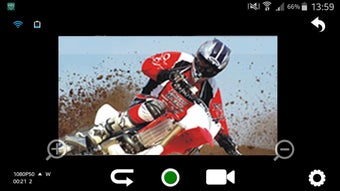
- Live Feed Preview: Displays real-time video output from the camcorder on the smartphone screen, improving shot composition and framing accuracy.
- Photo Capture: Enables instant photo capture from the camcorder via the app, useful for documenting still moments during video sessions.
- Direct Sharing Options: Facilitates immediate sharing of recorded videos and photos through email, Facebook, Twitter, and other supported platforms.
- Remote Settings Adjustment: Offers the ability to modify basic camcorder settings such as resolution, recording mode, and other configurable parameters via the mobile interface.
These capabilities are particularly useful in real-world scenarios like outdoor adventures, event coverage, or creative vlogging, where users need to maintain mobility while capturing high-quality content. The app’s streamlined workflow ensures minimal delay between action and capture, enhancing overall efficiency. It’s important to note that the video editing feature was intentionally removed to improve app stability on Android Lollipop and later versions, as confirmed by the developer. Users are encouraged to export their media and use third-party editing tools for advanced post-production needs.
User Interface, Workflow & Performance
The app features a clean, intuitive interface designed for quick access to core functions such as recording, playback, and sharing. Navigation is straightforward, with primary controls prominently displayed on the main screen, including a live feed view, recording button, and media gallery. The workflow is optimized for minimal user input—users can connect to the camcorder, view the live feed, and begin recording with just a few taps.
The app’s performance is consistent with standard mobile application behavior, though exact performance metrics such as CPU or RAM usage were not specified. The developer did not provide detailed information about battery consumption or background operation. However, since the app relies on Wi-Fi communication with the camcorder, stable network conditions are essential for uninterrupted performance.
Users are advised to ensure both the smartphone and camcorder are connected to the same Wi-Fi network for optimal functionality. The app’s stability appears to be prioritized, as the removal of the video editing feature was explicitly stated to enhance reliability. No reports of crashes or freezes were mentioned in the provided documentation.
Compatibility & System Requirements
The Veho Muvi K-Series app is compatible with Android devices running Lollipop (5.0) or higher. It is specifically designed to work with the Muvi K2, K3, K4, and K5 camcorder models. The app is available for free download from the Google Play Store, with no reported file size or installation footprint provided.
The developer did not specify exact system requirements such as minimum RAM, processor speed, or storage space needed for optimal operation. Compatibility information is limited to the operating system version and supported camcorder models. Users are advised to ensure that their Android device and camcorder are on the same Wi-Fi network for successful pairing and operation.
The app does not support iOS or other platforms based on the provided details.
Pros and Cons
Pros
- Free to download and use, with no in-app purchases or hidden fees.
- Enables wireless control of the camcorder from a smartphone for greater flexibility.
- Provides a live feed for accurate shot framing and remote operation.
- Supports direct sharing to social media and email platforms.
- Optimized for Android Lollipop and later, ensuring compatibility with modern devices.
Cons
- Lacks built-in video editing tools, requiring users to rely on external software.
- Only supports Android devices, limiting cross-platform usability.
- No detailed system requirements or performance data were provided.
- Requires both smartphone and camcorder to be on the same Wi-Fi network for operation.
- App functionality is restricted to the K-Series camcorder models only.
FAQ Section
Is the Veho Muvi K-Series app compatible with iOS devices?
The app is currently available only for Android devices. There is no official support for iOS at this time.
Can I use this app with camcorders other than the K-Series?
The app is specifically designed for the Muvi K2, K3, K4, and K5 camcorder models. It may not function with other Veho or third-party devices.
Is the app secure to download and use?
The app is available for free download from the Google Play Store, which provides built-in security checks. No additional security risks were reported in the provided documentation.
Does the app require an internet connection to function?
No, the app uses a local Wi-Fi connection between the smartphone and camcorder. An internet connection is not required for core functionality.
Are there regular updates for the app?
While the developer did not specify an update schedule, the app is compatible with Android Lollipop and later, suggesting ongoing maintenance for current devices.
Final Thoughts + CTA
The Veho Muvi K-Series app delivers a focused, reliable solution for users of the K-Series camcorders who want to enhance their video capture experience with wireless control and instant sharing. Its clean interface, live feed functionality, and seamless integration with Android devices make it a practical tool for vloggers, travelers, and event photographers. While the absence of in-app video editing may be a limitation for some, the decision to prioritize stability over added features reflects a user-centric design philosophy.
The app’s free availability and compatibility with modern Android devices further strengthen its value proposition. For users invested in the Veho Muvi K-Series ecosystem, this app is an essential companion. Download Veho Muvi K-Series now and unlock the full potential of your camcorder.






.png)
